
Cupixel: Make art with a twist
Cupixel Inc.Art & Design
3.486.00 Reviews
- Version
- 10.15.3
- Installs
- 100.00K
- Age Rating
- Everyone
Screenshots
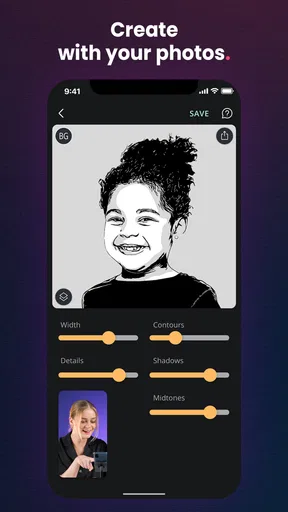
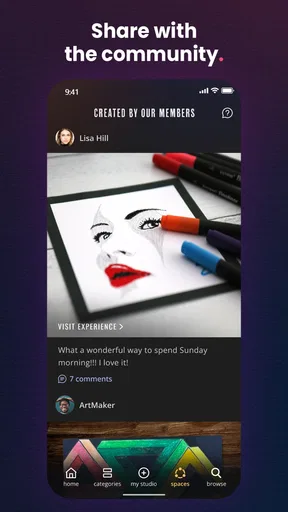
Our Review of Cupixel: Make art with a twist
 Analysis by Appyee
For me, the appeal of a guided art app is easy to understand: it can turn a blank page and a vague idea into a project I’m willing to start. The harder question is whether I’ll still open it once that first burst of curiosity passes. Cupixel is an art and design app from Cupixel Inc. that makes the process feel approachable, especially if you want a little direction rather than a completely open canvas. I’d think of it as a hands-on creative aid, not a replacement for learning to draw or for a full-featured digital studio.
The first-week appeal: getting past the blank page
In the first few sessions, the guided format is the main draw. Instead of deciding everything for yourself, you can choose a project and follow a path through it. That is useful when you have a short window of free time and want to make something without spending half of it searching for an idea. The experience suits a relaxed evening, a weekend activity with family, or a low-pressure way to try drawing again after a long break.
The most practical way to approach a first project is to treat it as a lesson rather than a test. Pick something that looks manageable, prepare your drawing surface before you begin, and work at a pace that lets you watch how each stage develops. A guide can help you get started, but it cannot choose your materials or make every mark for you. That distinction is part of the appeal: you still have to participate, and the result still feels like something you made.
Unleashing Creativity with Ease
When I first opened Cupixel, I was greeted with a clean and inviting interface. It’s designed to be intuitive, so you don’t have to worry about getting lost in complicated menus. The app offers a variety of art projects, ranging from simple sketches to more complex paintings, allowing you to choose what suits your mood or skill level.
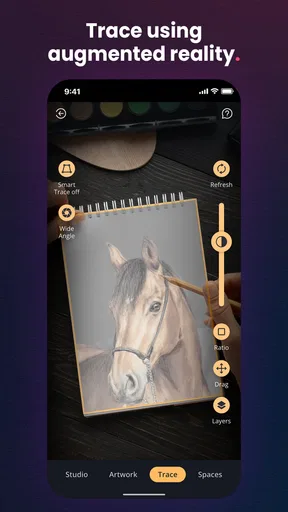
The coolest part? Cupixel uses augmented reality to guide you through the creative process. I was a bit skeptical at first, but it’s surprisingly effective. You just need to point your device at your canvas, and the app overlays a digital image that you can trace. It’s like having a virtual art teacher right there with you. The whole experience is incredibly satisfying because you can see your progress in real-time.
Making the guidance work in real life
AR tracing changes what the activity asks of you. You’re not starting with an empty surface and trying to invent every proportion from scratch; you’re following a visual reference while your hand does the drawing. That can be a helpful bridge for someone who has ideas but feels unsure about basic shapes. It is also a trade-off: if your main goal is to practise drawing from observation or inventing original compositions, tracing a guide won’t exercise those skills in the same way.
A useful routine is to separate the setup from the drawing. Choose the project and get your paper, pencils, or paints ready before settling into the tracing stage. Keep the device positioned where you can see the guide without constantly interrupting your hand movement, and make a light first pass rather than committing immediately to dark lines. These small choices make a guided session feel less fiddly and leave you more room to adjust the result in your own style.
It also helps to think about the setting. A calm table with steady support is a better fit than trying to draw while moving around or squeezing the phone into an awkward angle. If you’re doing a family activity, I’d set everything up first and let each person take a turn with a project rather than treating the screen as the whole event. The app can supply structure, but the enjoyable part still comes from the person holding the pencil and deciding how carefully to follow it.
Features That Stand Out
What really makes Cupixel shine are its thoughtful features:
- AR Technology: The augmented reality feature is the star of the show. It’s straightforward to use and adds a unique twist to the art-making process.
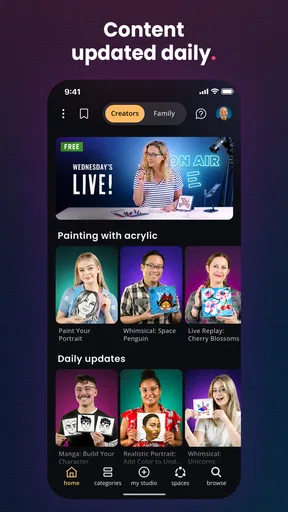
- Variety of Projects: Whether you’re interested in landscapes, portraits, or abstract art, there’s something for everyone. The app frequently updates with new content, so you’ll never run out of inspiration.
- Community Engagement: Cupixel has an in-app community where you can share your creations and get feedback. It’s a fantastic way to connect with other art enthusiasts and learn from each other.
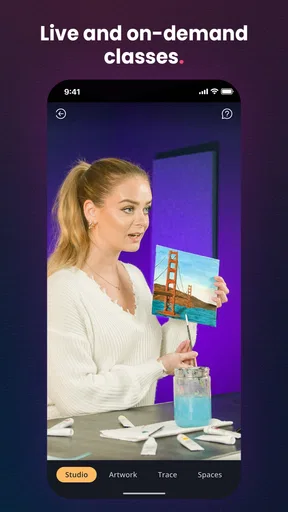
- Guided Tutorials: If you’re a complete beginner, the tutorials are your best friend. They break down each step, making it easy to follow along and build your confidence.
Month-to-month value: does it become a habit?
The app’s longer-term value depends on what you want from a creative routine. If you enjoy completing guided projects and like having a prompt ready when you sit down, the structure can make returning easier. I’d use it as a regular creative appointment: for example, after dinner one evening, set aside time to work on a small piece rather than expecting a long, uninterrupted art session. A finished drawing can be satisfying, and the act of making something tangible offers a welcome change from scrolling.
For someone who wants to develop independent drawing skills, I would use the guided projects as a starting point, then deliberately change one element: alter a color, add a detail, or draw a related object without the overlay. That turns a tracing session into a stepping stone instead of a repeated exercise. It is a useful distinction if you’re wondering whether the app teaches art or simply helps you produce an image. It can support confidence and practice, but the user still needs to decide what they want to learn and how to move beyond the guide.
Compared with a conventional drawing app, Cupixel’s strength is the connection between a digital guide and physical mark-making. A tablet-based art program is usually more flexible for editing, undoing, layering, and saving work digitally. A video tutorial can explain techniques, but it may leave you to work out proportions on your own. Cupixel occupies a different middle ground: it offers direction while you draw on a real surface. Choose it for that tactile, guided process; choose a digital canvas if editing and polish matter more, or a sketchbook and reference images if you want to practise observation without tracing.
Maintenance, cost, and small sources of friction
There is little routine upkeep involved in using an art app, but the physical setup matters. You need a suitable surface and your own drawing materials, and the device has to remain positioned so the guide is useful while you work. That can make a quick session less spontaneous than opening a sketchbook. If your usual art habit is to draw wherever you happen to be, this format may feel too dependent on arranging a workspace.
Cupixel is free to download, and it is rated for Everyone. The app has a 3.3 average from around 327 ratings, with more than 100,000 installs; I’d read that as a reason to try it with realistic expectations rather than assuming every part will suit every user. In-app purchases range from $7.99 to $99.99 per item, so I would explore the free experience first and consider paid options only if I find myself returning to the guided projects. The current version is 10.14.7, and the app was released on July 10, 2019.
The biggest potential source of fatigue is repetition. If you mainly enjoy the novelty of seeing an image appear as you trace it, that sensation may fade after a few projects. The same can happen if the available guidance does not match the subjects you want to draw, or if you would rather make decisions independently. I would not treat a growing project selection as a guarantee that the app will keep you interested; the lasting question is whether guided drawing itself is a process you enjoy.
There is also a difference between finishing a guided picture and feeling that you have learned a transferable technique. If you want measurable progress, give yourself a small goal for each session: practise smoother curves, pay attention to spacing, or try to redraw one part without the guide. That makes the activity more purposeful without turning a relaxing hobby into homework. It also helps you judge whether Cupixel is supporting your own interests or simply supplying a pleasant short-term distraction.
Why It’s Worth a Try
Now, you might be wondering, "Is this app really for me?" Well, if you’re looking for an enjoyable and relaxing way to unwind, Cupixel is definitely worth a try. It doesn’t matter if you’re a seasoned artist or someone who hasn’t picked up a brush since school; the app is designed to accommodate all skill levels.
One of the things I loved most was how it encouraged me to experiment. There’s no pressure to create a masterpiece. Instead, it’s all about the joy of making art and discovering your own style. Plus, the satisfaction of completing a project is incredibly rewarding.
Who should give it a place in their routine?
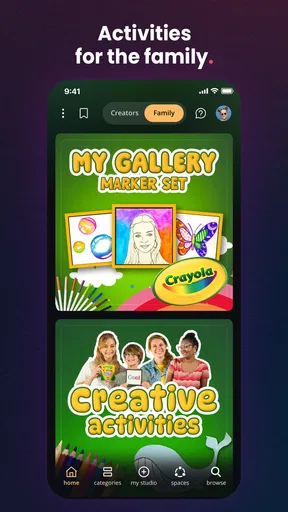
I’d recommend trying it if you feel more motivated by a clear starting point than by a blank sketchbook, enjoy working with physical art materials, or want a structured activity to share with someone who is new to drawing. It may also suit a parent looking for a calm, creative activity to do alongside a child, provided the adult is happy to help with setup and the child enjoys following visual direction. Since it is rated for Everyone, it is broadly suitable by age rating, though the best fit still depends on the individual’s interests and patience.
I’d skip it, or keep it as a secondary tool, if you already have a strong independent drawing practice and want advanced control over digital brushes, layers, and revisions. It is also not the best match for someone who dislikes tracing or expects the app to replace supplies and hands-on effort. If your priority is learning fundamentals such as perspective or anatomy, a course focused on those skills may be more direct; if your priority is making a physical picture with some guidance, Cupixel’s approach is more relevant.
One realistic way to test whether it earns a lasting place is to plan three separate sessions rather than judging it after a single first impression. Try one project when you have a little time, return on another day, and then see whether you want to make a third without needing to talk yourself into it. Notice whether you enjoy the drawing itself, not only the reveal at the end. That simple check can tell you more about its recurring value than a long list of possible projects.
Final Thoughts
In a world where we’re constantly bombarded with stress and responsibilities, taking time to create something beautiful can be a refreshing escape. Cupixel offers just that—a chance to slow down, focus, and indulge in a creative process that’s both fun and fulfilling.
So, if you’re ready to dive into the world of art with a twist, give Cupixel a download. It’s available on both Android and iOS, and trust me, you won’t regret it. Happy creating!
My long-term verdict
For me, Cupixel earns a place when I want a nudge into making art, not when I need an all-purpose studio or a complete drawing course. Its guided, physical approach gives beginners a way to begin and gives casual artists a reason to pick up materials. The most durable benefit is the combination of structure and personal effort: the guide gets you moving, while your choices shape the finished piece.
I’d start with the free version, keep the first project simple, and decide based on whether I want to return after the novelty has worn off. If you find yourself looking forward to the next session—or using a guide as a prompt and then making your own variations—it can become a pleasant creative habit. If you mainly want unrestricted digital editing or self-directed practice, another kind of art tool will serve you better. That’s the honest dividing line: Cupixel is most rewarding when guided tracing is part of the fun, rather than something you are merely tolerating to reach the finished image.
Verdict
Strengths of Cupixel: Make art with a twist
- User-friendly interface for beginners.
- Wide variety of art templates available.
- In-app tutorials enhance learning.
- Community features for sharing art.
- Offline mode for uninterrupted creativity.
Limitations of Cupixel: Make art with a twist
- Limited free content without subscription.
- Occasional app freezes reported.
- Requires high storage space.
- Limited customization options.
- In-app ads can be distracting.
Similar Picks in This Category
View All
Canva: AI Photo & Video Editor
Canva4.8

PENUP – Drawing-sharing SNS
Samsung Electronics Co., Ltd.4.5

Crafto
Kutumb App4.6

Sketchbook
Sketchbook4.1

ibis Paint X
ibis inc.4.5

Adobe Express: AI Photo, Video
Adobe4.6
Frequently Asked Questions
What is Cupixel and how does it work?
Cupixel is an innovative app designed to make art accessible to everyone, regardless of skill level. It combines technology with creativity, allowing users to create stunning pieces using augmented reality. The app guides you through a step-by-step process, overlaying images onto your canvas, which you can then trace and paint. This makes it perfect for both beginners and experienced artists.
Is Cupixel suitable for beginners who have never painted before?
Absolutely! Cupixel is designed to be user-friendly and intuitive, making it perfect for beginners. The app provides detailed instructions and augmented reality guidance, allowing even those with no prior experience to create beautiful art. Additionally, there are various tutorials and support available to help you get started and improve your skills over time.
What kind of tools and materials do I need to use Cupixel?
To use Cupixel, you'll need a smartphone or tablet with the app installed. For the physical painting, basic art supplies like canvases, brushes, and paints are necessary. The app itself offers comprehensive lists and recommendations for materials, ensuring you have everything you need to start your artistic journey without any hassle.
Does Cupixel offer any social features for sharing art?
Yes, Cupixel includes a vibrant community feature where users can share their artworks, gain inspiration, and connect with other artists. You can post your finished pieces directly to social media platforms or within the app community. This functionality not only encourages creative sharing but also allows for constructive feedback and collaboration among users.
Are there any subscription costs or in-app purchases in Cupixel?
Cupixel offers a range of subscription options, including a free version with limited features and premium subscriptions that unlock additional content, tutorials, and tools. In-app purchases are available for items like exclusive designs and advanced tutorials. It's advisable to review the app's pricing model to choose the best option for your needs.
